Slicer Server
It is possible to plug-in cubes from other slicer servers using the Slicer Server backend.
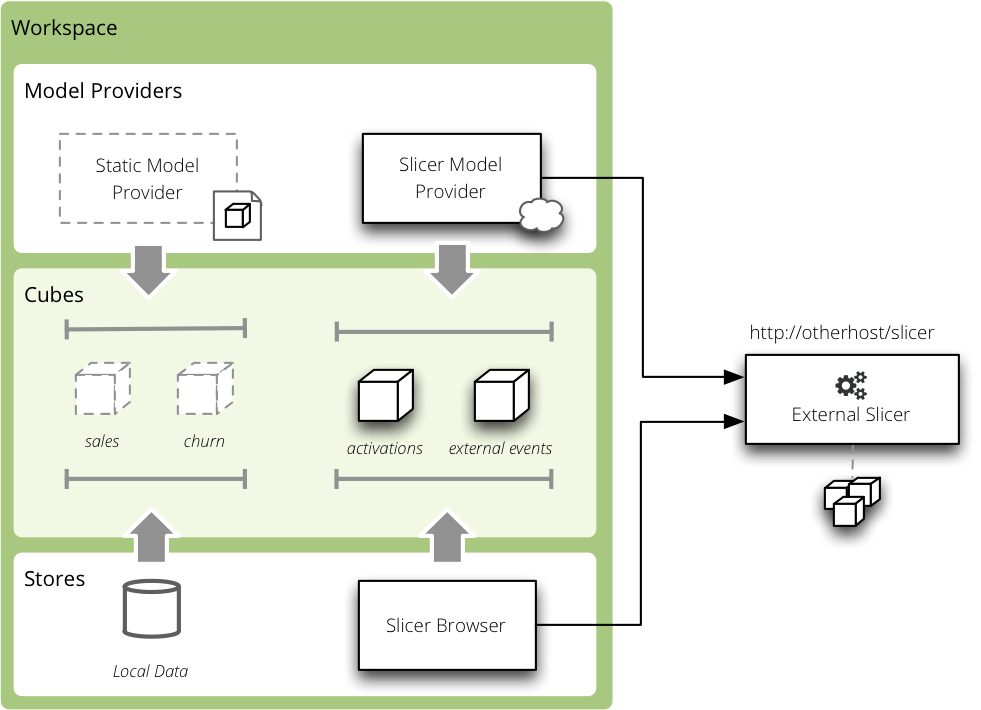
Slicer backend
Note
If the server has a JSON record limit set, then the backend will receive only limited number of facts.
Store Configuration and Model
Type is slicer
url– Slicer URLauthentication– authentication method of the source server (supported onlynoneandpass_parameter)auth_identity– authentication identity (or API key) forpass_parameterauthentication.
Example:
[store]
type: slicer
url: http://slicer.databrewery.org/webshop-example
For more than one slicer define one datastore per source Slicer server.
Model
Slicer backend generates the model on-the-fly from the source server. You have
to specify that the provider is slicer:
{
    "provider": "slicer"
}
For more than one slicer, create one file per source Slicer server and specify the data store:
{
    "provider": "slicer",
    "store": "slicer_2"
}
Example
Create a model.json:
{
    "provider": "slicer"
}
Create a slicer.ini:
[workspace]
model: slicer_model.json

[store]
type: slicer
url: http://slicer.databrewery.org/webshop-example

[server]
prettyprint: true
Run the server:
slicer serve slicer.ini
Get a list of cubes:
curl "http://localhost:5000/cubes"