Cubes 1.0 release notes
These release notes cover the new features and changes (some of them backward incompatible).
Overview
The biggest new feature in cubes is the “pluggable” model. You are no longer limited to one one model, one type of data store (database) and one set of cubes. The new Workspace is now framework-level controller object that manages models (model sources), cubes and datastores. To the future more features will be added to the workspace.
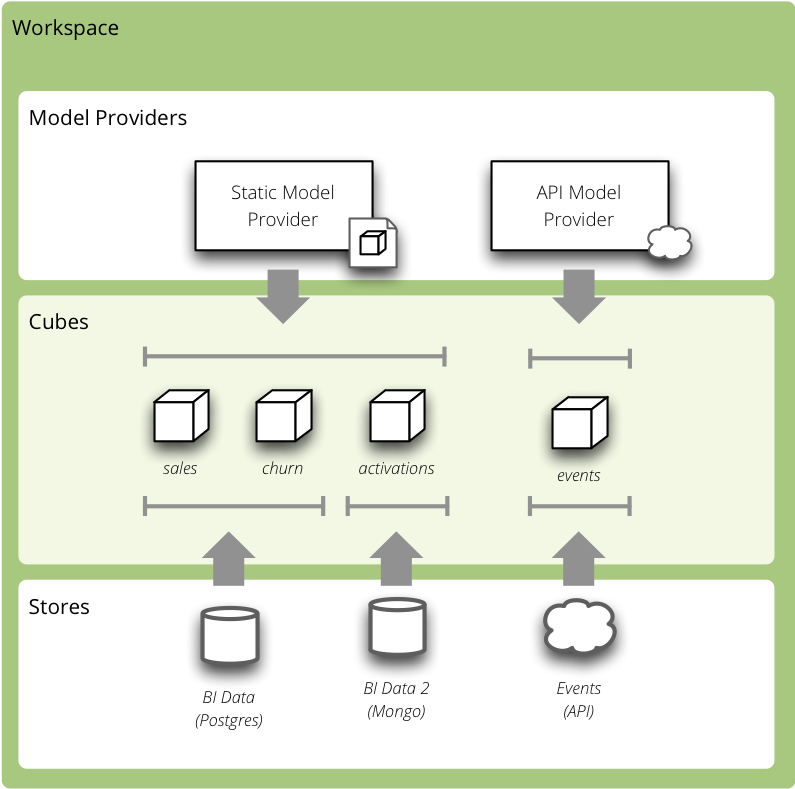
Analytical Workspace Overview
New Workspace related objects:
- model provider – creates model objects from a model source (might be a foreign API/service or custom database)
- store – provides access and connection to cube’s data
For more information see the Workspace documentation.
Other notable new features in Cubes 1.0 are:
- Rewritten Slicer server in Flask as a reusable Blueprint.
- New server API.
- support for outer joins in the SQL backend.
- Distinction between measures and aggregates
- Extensible authorization and authentication
- Visualizer
Python Versions
Cubes 1.0 supports Python >= 2.7 for Python 2 series and Python >= 3.4.1 for Python 3 series.
Analytical Workspace
The old backend architecture was limiting. It allowed only one store to be used, the model had to be known before the server started, it was not possible to get the model from a remote source.
For more details about the new workspace see the Analytical Workspace documentation.
Configuration
The slicer.ini configuration has changed to reflect new features.
The section [workspace] now contains global configuration of a cubes
workspace session. The database connection has moved into [store] (or
similar, if there are more).
The database connection is specified either in the [store] section or in a
separate stores.ini file where one section is one store, section name is
store name (as referenced from cube models).
If there is only one model, it can be specified either in the [workspace]
section as model. Multiple models are specified in the [models]
section.
To sum it up:
[server] backendis now[store] typefor every store[server] logandlog_levelhas moved to[workspace][model]is now eithermodeloption of[workspace]or list of multiple models in the[models]section
The old configuration:
[server]
host: localhost
port: 5000
reload: yes
log_level: info

[workspace]
url: postgres://localhost/mydata"

[model]
path: grants_model.json
Is now:
[workspace]
log_level: info
model: grants_model.json

[server]
host: localhost
port: 5000
reload: yes

[store]
type: sql
url: postgres://localhost/mydata
Check your configuration files.
See also
Server
Slicer server is now a Flask application and a reusable Blueprint. It is possible to include the Slicer in your application at an end-point of your choice.
For more information, see the recipe.
Other server changes:
- do not expose internal exceptions, only user exceptions
- added simple authentication methods: HTTP Basic (behind a proxy) and parameter-based identity. Both are permissive and serve just for passing an identity to the authorizer.
HTTP Server API
Server end-points have changed.
New end-points:
/version/info/cubes/cube/<cube>/model/cube/<cube>/aggregate/cube/<cube>/facts/cube/<cube>/fact/cube/<cube>/members/<dimension>/cube/<cube>/cell/cube/<cube>/report
Removed end-points:
/model– without replacement doe to the new concepts of workspace. Alternative is to get list of basic cube info using/cubes./model/cubes– without replacement, use/cubes/model/cube/<cube>– use/cube/<cube>/modelinstead/model/dimension/*– without replacement due to the new concepts of workspace- all top-level browser actions such as
/aggregate– now the cube name has to be explicit
Parameter changes:
/aggregateusesaggregates=, does not acceptmeasure=any more/aggregatenow acceptsformat=to generate CSV output- new parameter
headers=for CSV output: with headers as attribute names, headers as attribute labels (human readable) or no headers at all - it is now possible to specify multiple drilldowns, separated by
|in onedrilldown=parameter - cuts for date dimension accepts named relative time references such as
cut=date:90daysago-today. See the server documentation for more information. - dimension path elements can contain special characters if they are escaped
by a backslash
\such ascut=city:Nové\ Mesto
Many actions now accept format= parameter, which can be json, csv
or json_lines (new-line separated JSON).
Response changes:
/cubes(replacement for/model) returns a list of basic cubes info: name, label, description and category. It does not return full cube description with dimensions./cube/<cube>/modelhas new keys:aggregatesandfeatures
See also
Outer Joins
Support for thee types of joins was added to the SQL backend: match (inner), master (left outer) and detail (right outer).
The outer joins allows for example to use whole date dimension table and
have “empty cells” for dates where there are no facts.
When an right outer join (detail method) is present, then aggregate values
are coalesced to zero (based on the function either the values or the result
is coalesced). For example: AVG coalesces values: AVG(COALESCE(c, 0)), SUM
coalesces result: COALESCE(SUM(c), 0).
Statutils
Module with statistical aggregate functions such as simple moving average or weighted moving average.
Provided functions:
wma– weighted moving averagesma– simple moving averagesms– simple moving sumsmstd– simple moving st. deviationsmrsd– simple moving relative st. deviationsmvar– simple moving variance
The function are applied on the already computed aggregation results. Backends migh handle the function internally if they can.
Window functions respect window_size property of aggregates.
Browser
- cuts now have an invert flag (might not be supported by all backends)
- aggregate() has new argument split which is a cell that defines artificial flag-like dimension with two values: 0 – aggergated cell is outside of the split cell, 1 – aggregated cell is within the split cell
Both invert and split features are still provisional, their interface might change.
Slicer
- added
slicer model convertto convert between json and directory bundle
Model
Model and modeling related changes are:
- new concept of model providers (see details below)
- measure aggregates (see details below)
- cardinality of dimensions and dimension levels
- dimension and level roles
- attribute missing values
- format property of a measure and aggregate
- namespaces
Note
cubes, dimensions, levels and hierarchies can no longer be
dictionaries, they should be lists of dictionaries and the dictionaries
should have a name property set. This was depreciated long ago.
Model Providers
The models of cubes are now being created by the model providers. Model
provider is an object that creates Cubes and Dimension instances from it’s
source. Built-in model provider is cubes.StaticModelProvider which
creates cubes objects from JSON files and dictionaries.
See also
Namespaces
Cubes from stores can be wrapped in a model namespace. By-default, the namespace is the same as the name of the store. The cubes are referenced as NAMESPACE.CUBE such as foreign.sales. For backward compatibility reasons and for simplicity there are two cube lookup methods: recursive and global.
Measures and Aggregates
Cubes now distinguishes between measures and aggregates. measure represents a numerical fact property, aggregate represents aggregated value (applied aggregate function on a property, or provided natively by the backend).
This new approach of aggregates makes development of backends and clients much easier. There is no need to construct and guess aggregate measures or splitting the names from the functions. Backends receive concrete objects with sufficient information to perform the aggregation (either by a function or fetch already computed value).
Functionality additions and changes:
- New model objects:
cubes.Attribute(for dimension or detail),cubes.Measureandcubes.MeasureAggregate. - New model creation/helper functions:
cubes.create_measure_aggregate(),cubes.create_measure() cubes.create_cube()is backcubes.Cube.aggregates_for_measure()– return all aggregates referring the measurecubes.Cube.get_aggregates()– get a list of aggregates according to namescubes.Measure.default_aggregates()– create a list of default aggregates for the measurecalculators_for_aggregates()in statutils – returns post-aggregation calculators- Added a cube metadata flag to control creation of default aggregates:
implicit_aggregates. Default is
True - Cube initialization has no creation of defaults – it should belong to the
model provider or
create_cube()function - If there is no function specified, we consider the aggregate to be specified in the mappings
record_count
Implicit aggregate record_count is no longer provided for every cube. It has to be explicitly defined as an aggregate:
"aggregates": [
    {
        "name": "item_count",
        "label": "Total Items",
        "function": "count"
    }
]
It can be named and labelled in any way.
If cube has no aggregates, then new default aggregate named fact_count is created.
Dimension Links
Linking of dimensions to cubes can be fine-tuned by specifying multiple properties of the dimension in the cube’s context:
- hierarchies – cube’s dimension can have only certain hierarchies from the original dimension
- detault_hierarchy_name – it is possible to specify different default hierarchy
- nonadditive – override the dimensions’ non-additive property
- cardinality – use if dimension might have different cardinality in the new context
- alias – reuse dimensions in a cube but give them different names
Backends
- Backends should now implement provide_aggregate() method instead of aggregate() – the later takes care of argument conversion and preparation. See Backends for more information.
SQL Backend
- New module
functionswith new AggregationFunction objects - Added get_aggregate_function() and available_aggregate_functions()
- Renamed
starmodule tobrowser - Updated the code to use the new aggregates instead of old measures. Affected parts of the code are now cleaner and more understandable
- Moved calculated_aggregations_for_measure to library-level statutils module as calculators_for_aggregates
- function dictionary is no longer used
New Backends
- Mixpanel:
../backends/mixpanel - Slicer: Slicer Server
- Mongo:
../backends/mongo - Google Analytics:
../backends/google_analytics
See also
Visualizer
There is a cubes visualizer included in the Cubes that can connect to any cubes slicer server over HTTP. It is purely HTML/JavaScript application.
Other Minor Changes
- Cell.contains_level(dim, level, hierarhy) – returns
Truewhen the cell contains levellevelof dimensiondim - renamed AggregationBrowser.values() to
cubes.AggregationBrowser.members() - AggregationResult.measures changed to AggregationResult.aggregates (see
AggregationResult) - browser’s __init__ signature has changed to include the store
- changed the exception hierarchy. Now has two branches:
UserErrorandInternalError– theUserErrorcan be returned to the client, theInternalErrorshould remain privade on the server side. to_dict()of model objects returns an ordered dictionary for nicer JSON output- New class
cubes.Factsthat should be returned bycubes.AggregationBrowser.facts() cubes.cuts_from_string()has two new arguments member_converters and role_member_converters- New class
cubes.Drilldownto get more information about the drilldown
Migration to 1.0
Checklists for migrating a Cubes project from pre-1.0 to 1.0:
The slicer.ini
- Rename
[workspace]to[store] - Create new empty
[workspace] - Move
[server] backendto[store] type - Move
[server] log,log_levelto the new[workspace] - Rename
[model] pathto[models] mainand remove all non-model references (such aslocales).
The minimal configuration looks like:
[store]
type: sql
url: sqlite:///data.sqlite

[models]
main: model.json
See configuration changes for an example and configuration documentation for more information.
The Model
There are not many model changes, mostly measures and aggregates related.
- Make sure that
dimensions,cubes,levelsandhierarchiesare not dictionaries but lists of dictionaries withnameproperty. - Create the explicit
record_countaggregate, if you are using it. Note that you can name and label the aggregate as you like.
"aggregates": [
    {
        "name": "record_count",
        "label": "Total Items",
        "function": "count"
    }
]
- In
measuresrenameaggregationstoaggregatesor even better: create explicit, full aggregate definitions.
See Aggregates for more information.
Slicer Front-end
The biggest change in the front-ends is the removal of the /model
end-point without equivalend replacement. Use /cubes to get list of
provided cubes. The cube definition contains whole dimension descriptions.
- Change from
/modelto/cubes - Change from
/model/cube/<name>to/cube/<name>/model - Cube has to be explicit in every request, therefore
/aggregatedoes not work any more, use/cube/<name>/aggregate - Change
aggregateparametermeasuretoaggregates
Refer to the OLAP Server documentation for the new response structures. There were minor changes, mostly additions.
Additional and Optional Considerations for Migration
- if your model is too big, split it into multiple models and add them to the
[models]section. Note that the dimensions can be shared between models. - put all your models into a separate directory and use the
[workspace]
models_path
property. The paths in[models]are relative to themodels_path - if you have muliple stores, create a separate
stores.inifile where the section names are store names. Set the[workspace] storesto thestores.inipath if it is different than default. - Add
"role"="time"to a date dimension – you might benefit from new date-related additions and special dimension handling in the available front-ends - Review
joinsand set appropriate join method if desired, for exampledetailfor a date dimension. - Add
cardinalitymetadata to dimension levels if appropriate. - Look at the cube’s model
featuresproperty to learn what the front-end can expect from the backend for that cube - Look at the
/inforesponse